
MeterGrapher Software Package – User Documents – Using MeterGrapher
Response times
Using MeterGrapher
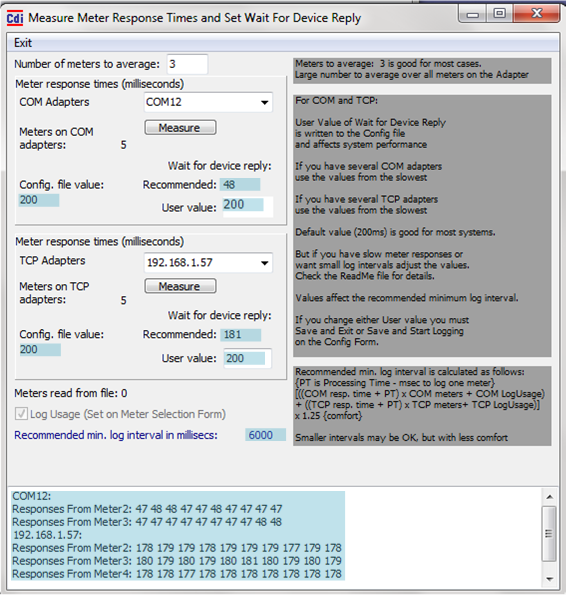
Recommended value for COM. This is the maximum of all the values polled. Individual values can be seen in the memo field at the bottom of this form.
This is the current value for COM from the Config.
Choose a value. This will be the new value for COM in the Config, and will affect the Recommended Minimum log interval (below).
Recommended value for TCP. This is the maximum of all the values polled. Individual values can be seen in the memo field at the bottom of this form.
This is the current value for TCP from the Config.
Choose a value. This will be the new value for TCP in the Config, and will affect the Recommended Minimum log interval (below).
The recommended value is based on the User values for COM and TCP, and the numbers of meters on each type of adapter. The calculation is shown on the right of the screen.
Responses (milliseconds) from meters. The ‘number of meters to average’ (top of this page, 3 in this example) on each adapter are sampled ten times.