
MeterGrapher Software Package – User Documents – Using MeterGrapher
Configuration 3 – Add Details
Using MeterGrapher
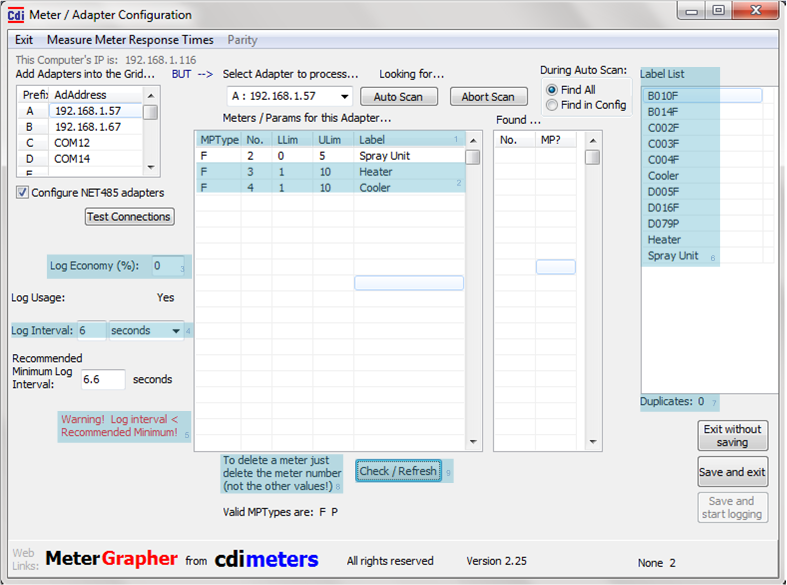
MP Type: Meter/Parameter Type | No: Meter Number (Modbus addrss) | LLim: Lower Limit (Optional) | ULIM: Upper Limit (Optional) | Label: Meter Label used on graphs and charts. Up to 15 characters , must be unique. MeterGrapher constructs labels from the adapter prefix and the meter number. These are guaranteed to be unique. The user may change labels as required but uniqueness must be preserved.
Enter values for all meters on the selected adapter. On first use, meters found on autoscan will be entered into the input grid. Upper and Lower limits must be added if required.
List of all current labels, a duplicate would be marked with an asterisk.
A Log Economy value other than zero will cause fewer points to be written to the log file than are polled. This can be used if conditions are stable and log file sizes are an issue. See Log Economy
Recommended minimum is calculated from meter response times and number of meters. If the value is greater than the user requested log interval a warning is shown. The value depends on whether usage is to be logged. If your chosen logging interval is small (typically less than 0.5 seconds per meter) and you get this warning, use Measure Meter Response Times (Menu at the top of this screen) to tune up the polling parameters. More information on the Response times – Menu page and the two following pages.
If you get this warning Message “Warning! Log interval < Recommended Minimum” with your favoured logging interval, use Measure Meter Response Times (Menu item at the top of this form) to tune up the polling parameters. More information on the Response times – Menu page and the two following pages.
If you delete the whole line of data, the line above it is assumed to be the last meter for this Adapter.
Use Check / Refresh any time to check the validity of entries so far and update the label list.
Count of duplicate labels. Must be 0 before configuration can be saved.